For those of you who would like to read more about SQL Server in general, please find your way to my new blog, http://sqlservertoday.blogspot.com/
Please feel free to contact me at jason@longcast.net if you have any Deltek Vision questions.
Thanks, Jason
Tuesday, October 18, 2011

Friday, August 5, 2011
Adding indexes to speed up your Voucher Detail Report
I was working with a fellow business analyst today, and we were researching why some of our voucher detail reports were taking over 13 minutes to complete.
We took the right approach by gathering as much information as possible before attempting to fix the problem.
1)We started by profiling the database to capture the sql generated by the report.
2)We also ran PSSDiag while the report was running to collect information about the state of the SQL Server while the report was run.
3)Next we ran a Performance Analysis log on the PSSDiag output and also ran the SQL Server RML utilities against the trace files that were generated.
As you might have guessed, none of the steps taken above raised any red flags.
So, we took a look at the SQL that was captured by the profiler during the report creation. We parsed up the SQL and ran it manually within SQL Management Studio.
Initially, we were startled by how large the SQL statement was. After running it in Management studio, we were then concerned about the statement taking well over 13 minutes to produce a small number of rows.
We took the same SQL statement we ran it management studio and processed it through the Database Tuning Advisor and found that several indexes and statistics were missing and were recommended based on our sql statement.
I want to point out that the all of recommendations made by the database tuning advisor are highly dependent upon the options we used to run the voucher detail report and our configuration of our vision system. These same indexes may do nothing for you.
My goal of this post was to at least show the handful of indexes that reduced our query time from 13 minutes down to under 10 seconds. As I mentioned before, these queries may not work for your environment and may make reports run slower. As always, please test anything I am doing on this site on a development server and ensure proper testing before placing anything on a production environment.
Below are the indexes. Maybe you will consider something similar if you are having performance problems with your voucher detail reports.
CREATE NONCLUSTERED INDEX [NC_IDX_LedgerAP_CASH_REQ_1] ON [dbo].[LedgerAP]
(
[Voucher] ASC,
[Vendor] ASC,
[Line] ASC,
[WBS1] ASC,
[WBS2] ASC,
[WBS3] ASC,
[TransType] ASC,
[SubType] ASC,
[Period] ASC
)
INCLUDE ( [Account],
[Desc2],
[PartialPayment],
[Discount],
[BilledWBS1],
[BilledWBS2],
[BilledWBS3],
[BilledInvoice],
[TaxAmount],
[TransactionAmount],
[AmountSourceCurrency]) WITH (SORT_IN_TEMPDB = OFF, IGNORE_DUP_KEY = OFF, DROP_EXISTING = OFF, ONLINE = OFF) ON [PRIMARY]
go
CREATE NONCLUSTERED INDEX [NC_IDX_LedgerAP_CASH_REQ_2] ON [dbo].[LedgerAP]
(
[Voucher] ASC,
[Vendor] ASC,
[Line] ASC,
[TransType] ASC,
[WBS1] ASC,
[WBS2] ASC,
[WBS3] ASC,
[SubType] ASC,
[Period] ASC
)
INCLUDE ( [Account],
[Desc2],
[PartialPayment],
[Discount],
[BilledWBS1],
[BilledWBS2],
[BilledWBS3],
[BilledInvoice],
[TaxAmount],
[TransactionAmount],
[AmountSourceCurrency]) WITH (SORT_IN_TEMPDB = OFF, IGNORE_DUP_KEY = OFF, DROP_EXISTING = OFF, ONLINE = OFF)
go
CREATE NONCLUSTERED INDEX [NC_IDX_LEDGERAP_CASH_REQ_3] ON [dbo].[LedgerAR]
(
[AutoEntry] ASC,
[Invoice] ASC,
[WBS1] ASC,
[WBS2] ASC,
[WBS3] ASC,
[TransType] ASC,
[SubType] ASC
)
INCLUDE ( [AmountSourceCurrency]) WITH (SORT_IN_TEMPDB = OFF, IGNORE_DUP_KEY = OFF, DROP_EXISTING = OFF, ONLINE = OFF)
go
CREATE NONCLUSTERED INDEX [NC_IDX_LEDGERAR_CASH_REQ_1] ON [dbo].[LedgerAR]
(
[WBS1] ASC,
[Invoice] ASC,
[TransType] ASC,
[SubType] ASC,
[AutoEntry] ASC
)
INCLUDE ( [AmountSourceCurrency]) WITH (SORT_IN_TEMPDB = OFF, IGNORE_DUP_KEY = OFF, DROP_EXISTING = OFF, ONLINE = OFF)
go
CREATE NONCLUSTERED INDEX [NC_IDX_VO_CASH_REQ_1] ON [dbo].[VO]
(
[PaidPeriod] ASC,
[LiabCode] ASC,
[PayTerms] ASC,
[PaymentDate] ASC,
[Company] ASC,
[Vendor] ASC,
[Voucher] ASC,
[TransDate] ASC,
[BankCode] ASC,
[Invoice] ASC,
[InvoiceDate] ASC
)WITH (SORT_IN_TEMPDB = OFF, IGNORE_DUP_KEY = OFF, DROP_EXISTING = OFF, ONLINE = OFF)
go
CREATE NONCLUSTERED INDEX [NC_IDX_VO_CASH_REQ_2] ON [dbo].[VO]
(
[LiabCode] ASC,
[Company] ASC,
[PayTerms] ASC,
[Vendor] ASC,
[Voucher] ASC,
[TransDate] ASC,
[BankCode] ASC,
[Invoice] ASC,
[InvoiceDate] ASC
)WITH (SORT_IN_TEMPDB = OFF, IGNORE_DUP_KEY = OFF, DROP_EXISTING = OFF, ONLINE = OFF) ON [PRIMARY]
go
CREATE NONCLUSTERED INDEX [NC_IDX_VO_CASH_REQ_3] ON [dbo].[VO]
(
[LiabCode] ASC,
[Company] ASC,
[PayTerms] ASC,
[Vendor] ASC,
[Voucher] ASC
)WITH (SORT_IN_TEMPDB = OFF, IGNORE_DUP_KEY = OFF, DROP_EXISTING = OFF, ONLINE = OFF) ON [PRIMARY]
go
Wednesday, July 20, 2011
Capturing & Analyzing the Tempdb impact of the PRSummary build
In this series, I hope to get an understanding of how the PRSummary build has changed the way it interacts with tempdb from Vision 5.1 to Vision 6.1.
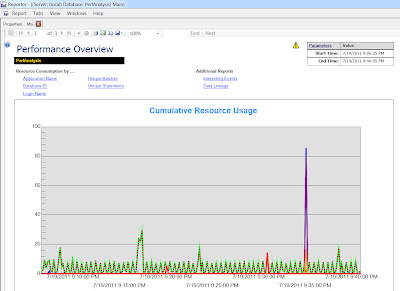
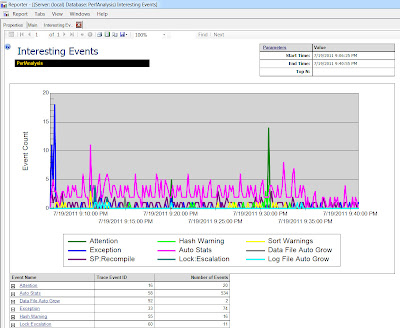
By clicking on the interesting events link, you will get an nice high level view of events that should be looked at.
Before we analyze the tempdb impact, I want to talk about how to use the tools to perform the analysis. There are a series of great software tools that I use and need to be installed on your servers in order to efficiently log the process. Not only do these tools to a good job logging activity, they also provide an amazing analysis interface.
I will list the tools out and where to get them, but as part of this post I will not walk you through how to install them and cannot guarantee version compatibility with your system. Again, we will go through the actual impact in an upcoming blog post.
Below are the tools
PAL (Performance Analysis of Logs) Tool
http://pal.codeplex.com/
http://pal.codeplex.com/
Powershell version 2.0
RML Utilities: Used in house by Microsoft support engineers to diagnose customer support issues.
Microsoft Report Viewer distributable
http://www.microsoft.com/download/en/details.aspx?id=6576
http://www.microsoft.com/download/en/details.aspx?id=6576
Log Parser: Allows querying against log, xml, csv and other windows files.
http://www.microsoft.com/download/en/details.aspx?id=24659
http://www.microsoft.com/download/en/details.aspx?id=24659
Performance Dashboard Reports: SSRS Reports used to monitor sql server from within management studio.
http://www.microsoft.com/download/en/details.aspx?id=22602
http://www.microsoft.com/download/en/details.aspx?id=22602
MSChart.exe: Utility for providing additional charting functionality.
http://www.microsoft.com/download/en/details.aspx?id=14422
http://www.microsoft.com/download/en/details.aspx?id=14422
PSSDIAG: Diagnostic utility to collection perfmon logs, sysmon logs, profiler traces, event logs.
http://www.microsoft.com/download/en/details.aspx?amp;amp;amp;amp;amp;amp;amp;DisplayLang=en&id=11886
http://www.microsoft.com/download/en/details.aspx?amp;amp;amp;amp;amp;amp;amp;DisplayLang=en&id=11886
Onto the fun part. How to use the tools.
The first step in the collection process is starting PSSDiag.exe. For those of you, who are trying to do this as well in your environment, look for that executable in the directory where the install placed it, and run that executable as an administrator.
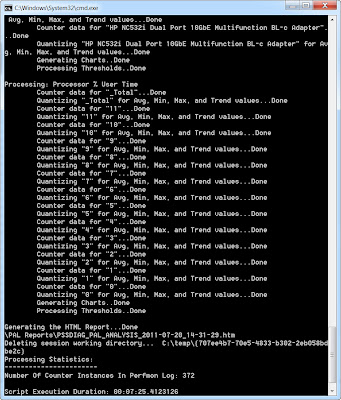
All you do to start it is just double click it. The executable will launch a command prompt that will generate several messages. The command prompt prints a message to the screen once it has finished initializing, signaling that it’s ready for testing. Below is the output generated from my when I clicked on the PSSDIAG.exe.
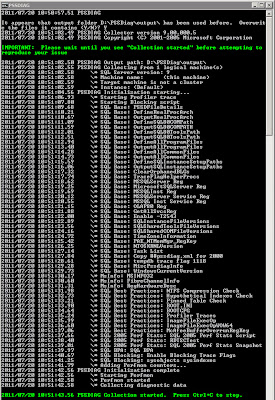
All you do to start it is just double click it. The executable will launch a command prompt that will generate several messages. The command prompt prints a message to the screen once it has finished initializing, signaling that it’s ready for testing. Below is the output generated from my when I clicked on the PSSDIAG.exe.

After starting PSSDiag, fire up something you want to monitor. I fired up the good ol' PRSummary build in Vision as my example. Based on the amount of data we have and the fact I was testing this on a dev box, our build takes anywhere between 20 and 40 minutes to complete.
Once your process you are monitoring finishes, hit Control + C in the command prompt which will stop PSSDiag. If you are running this for the first time, don't forget to do this, otherwise the collection process will eventually exhaust your disk space. One additional note, please remember to rename the output folder so that you can save your results without them being overwritten the next time PSSDIag is started.
So, I may have gotten ahead of myself, but all of the collection output and analysis files are stored into a folder called output within the PSSDiag installation directory. If you want to use the PAL tool, you will need to locate the .BLG file. This is the file you will open using the PAL tool.
Onto the PAL tool.
The PAL Tool assumes that you have a database name PerfAnalysis installed on your database server. I can't remember if the installation process created this or if I had to create this manually. Obviously, If you do not have one, you will need to create an empty database named PerfAnalysis. I
If you have installed PAL, it usually writes itself into the program files\PAL\ directory on your OS drive. Locate the PALWizard.exe and launch it.
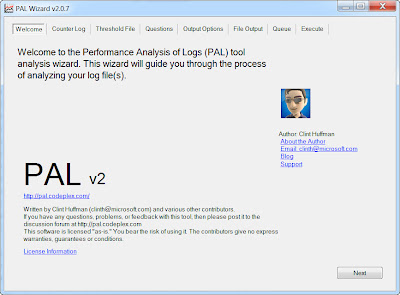
The PAL tool will walk you through a wizard type interface. The most important items to fill out are below. For simplicity, I will not share all of my server details with you.
1. Find the .BLG file in the output folder and use that for the counter log file path.
2. Threshold file title is the version of SQL Server that you are on.
3. Number of processors the SQL Server has that you performed your PSSDiag on.
4. If the 3GB switch is enabled on your SQL Server.
5. If your Server is 32 or 64 Bit.
6. How much memory you have on the server dedicated to SQL Server.
7. Next, next, next....finish.
After clicking finish, there will be another command prompt launched which will give you the status of the output that PAL creates. PAL will create an HTM file that it will place in the PAL installation directory. This process will take several minutes and will increase in time depending on the size of your collection.
PAL produces an html file with several stats, charts and summaries. At the top of the web page, there are alerts by chronological order and by type of alert that allow you to drill down into the html file.
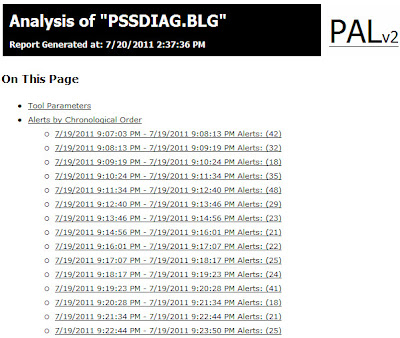
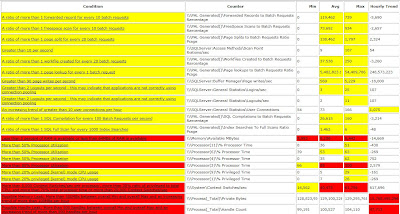
When drilling down, you will see something like the following.
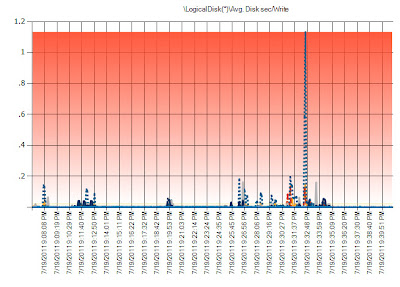
Like I mentioned before, there are charts as well.
RML is an additional type of utiltiy that Microsoft uses in house for testing. To fire up RML, launch the RML command prompt. It will be somewhere in your system tray or start menu.

The PAL tool will walk you through a wizard type interface. The most important items to fill out are below. For simplicity, I will not share all of my server details with you.
1. Find the .BLG file in the output folder and use that for the counter log file path.
2. Threshold file title is the version of SQL Server that you are on.
3. Number of processors the SQL Server has that you performed your PSSDiag on.
4. If the 3GB switch is enabled on your SQL Server.
5. If your Server is 32 or 64 Bit.
6. How much memory you have on the server dedicated to SQL Server.
7. Next, next, next....finish.
After clicking finish, there will be another command prompt launched which will give you the status of the output that PAL creates. PAL will create an HTM file that it will place in the PAL installation directory. This process will take several minutes and will increase in time depending on the size of your collection.

PAL produces an html file with several stats, charts and summaries. At the top of the web page, there are alerts by chronological order and by type of alert that allow you to drill down into the html file.

When drilling down, you will see something like the following.

Like I mentioned before, there are charts as well.

RML is an additional type of utiltiy that Microsoft uses in house for testing. To fire up RML, launch the RML command prompt. It will be somewhere in your system tray or start menu.
Type the following command in your RML prompt:
readtrace -IDriveLetter:\outputdirectory\nameofyourtracefile.trc -oDriveLetter:outputdirectory\yourchoiceoffilename
For example, my command was:
readtrace -ID:\Vision61Summary-output\Vision_sp_trace.trc -oD:\
Vision61Summary-output\Vision_PRSummaryOUTPUT

By clicking on the interesting events link, you will get an nice high level view of events that should be looked at.

Now that we have walked through the tools involved in capturing and analyzing output, this is probably a good place to finish this part of the post. Any further, and we will be entering the analysis of the PRSummary build.
I will follow up in a few days with a second post analyzing what I found in the output. Stay tuned and enjoy.
Thursday, July 7, 2011
Deltek Vision 61. SP4 Hot Fix #35
A fix has been made to ensure firing order on scheduled workflows. In the past, for both scheduled and user initiated work flows, the order of the events were not guaranteed.
According to the hot fix documentation:
“When a scheduled workflow was initiated, the ActionOrder field was not
referenced. This resulted in the actions not firing in the correct order."
This is great news. Next we want Deltek to ensure firing order on user initiated workflows.
Enjoy…
Thursday, June 23, 2011
Hot Fix #32, invoice previewing improvements...
Hot Fix #32, Invoice previewing performance enhancements.
Before I mention the invoice previewing preview enhancements, I wanted to mention to folks that some of Deltek’s hot fixes are accumulative. Each subsequent accumulative hot fix may not contain information about items already addressed and fixed in prior hot fixes.
Invoice previewing improvements were introduced in Hot Fix #31 and are also included in Hot Fix #32. What some folks out in the user community were experiencing were small delays in while previewing invoices. These delays were seen as pauses between running the preview and then actually seeing the “Green Wheel” turn on the Microsoft SQL Server report. In addition, once the “Green Wheel” started to turn, the report did not take much time to run at all, but delays were seen up to that point.
I ran fiddler on our systems and took a screen shot of the delay I discussed. As seen below, the majority of the previewing time occurred during the “Building Report phase” which was occurring in the MethodCall .Net code.

Deltek has included performance improvement related to the building of the report which will reduce previewing times. It’s important to note that there is a one-time previewing delay each time a new template is loaded for preview, but all subsequent previews using the same template should see much better performance.
Enjoy....
Thursday, May 26, 2011
Hot Fix #32 for Vision 6.1 SP4
Hot Fix #32
Hot fix #32 contains two important performance improvements that were fixed in Hot fix #31. I'll cover one of the improvements below, and will post another entry later discussing the second performance fix.
The first performance improvement is related to a delete statement that is run in the background and is triggered my multiple events during a user’s activity within Vision. The delete statement below was responsible for clearing out old entries in the workflow log table.
DELETE From WorkflowLog WHERE
datediff(dd,WorkflowTime,GETUTCDATE()) >
(SELECT WorkflowLogLength from CFGSystem )
Based on the execution plan below, you can see that this is a less than ideal delete statement, and the performance degradation is multiplied if you are keeping millions of rows in your workflowlog table.

As part of Hot Fix #32, Deltek re-worked the delete statement and it looks something like what is listed below.
DELETE From WorkflowLog WHERE WorkflowTime < @datevariable
Based on the execution plan below, you can see the plan is much simpler and leads to better overall performance.

If you want to squeeze out even better performance, add a non clustered index on the workflowtime column for the workflowlog table.
Enjoy
Friday, November 5, 2010
Creating an Atom Feed from Vision reports
Vision 6.1 SP4 now supports SSRS 2008 R2. R2 has many new features that include Atom rendering extensions. This means a report can be a data feed. What this really means is that a report can be a data source that can be used by any application that can consume a feed.
For example, Excel 2010 with PowerPivot can consume an Atom Feed. For the most part, anything that can consume XML can also consume an ATOM feed.
I tested this out by going to the ReportManager URL for our SSRS 2008 R2 reporting server that is used by Vision. The default URL for most R2 installations usually looks something like this: http://YOUR_REPORT_SERVER_NAME/Reports_SQL2008R2
Find your Vision report and run the report. You should notice an orange icon in which I have highlighted with a red box around it. This is the export to data feed icon.
See the screen shot below.


When you click the orange icon, you will be prompted to save the atom feed. An improtant note about the screen shot below is if you have Excel 2010 installed from the machine you are exporting the data feed to, you will have an "Open" button to open directly into excel.

I chose to save the Atom file, which you then can open in any text editor to view, or you can view directly in your browser like the screen shot below.

Although it may be hard to detect based on my poor screen shot, you will see a URL listed in the collection XML tag. If you replace the "&" to "&" in the URL, copy and paste it into your browser, you will get an enormous XML data dump of the contents of the report. This is the XML output from the data feed.
From here, you can choose to open the XML or just the .atomsvc file directly in Excel 2010, or in any other data feed consumer and your Vision reports can be a datasource for the Web 2.0 revolution.
Enjoy!!!
Thursday, November 4, 2010
History of Deltek Acquisitions
Yesterday I quickly blogged about Deltek's purchase of INPUT. But I got to thinking last night, that Deltek has acquired many companies over the years which has helped the evolution of their products. Below is a list of the companies they have acquired during their short history.
Deltek Acquisitions
INPUT (10-1-2010)
Maconomy (7-21-2010)
MySBX (12-15-2009)
WST Pacific Pty Ltd (5-30-2007)
AIM Corp (5-16-2007)
C/S Solutions (7-27-2006)
Welcom (5-20-2006)
Wind2 (10-4-2005)
Semaphore Inc (8-10-2000)
A/E Management Services (4-25-2000)
Harper & Shuman Inc (6-1-1998)
SalesKit Software Corp (5-5-1998)
Wednesday, November 3, 2010
Deltek Acquires INPUT
Looks like Deltek gobbled up another company. INPUT, which provides opportunity and business development intelligence, was purchased for $60 million. More details below.
http://www.deltek.com/company/pressroom/showfullstory.asp?show=555
As a side note, Deltek also purchased Maconomy back in June for upwards of $70 million. It appears that they are buying the last few ERP pieces left in the market space for AEC.
http://www.deltek.com/company/pressroom/showfullstory.asp?show=555
As a side note, Deltek also purchased Maconomy back in June for upwards of $70 million. It appears that they are buying the last few ERP pieces left in the market space for AEC.
Tuesday, November 2, 2010
Web Gardens
Out of the box,it seems that implementing web gardens for the application server should work with Vision 6.1 SP4 and could even create better performance while providing some level of fail-over tolerance for single server implementations.
Monday, November 1, 2010
Vision 6.1 SSRS Reports
As I’ve mentioned in previous posts, when Deltek announced that they were switching to SSRS for their reporting platform, I was ecstatic. I thought how much more wonderful the world was going to be by moving off of a heavy I/O dependent reporting architecture like Actuate and moving to a memory hungry architecture like SQL Server Reporting Services.
In previous versions of Vision that use actuate, administrators would have to crawl through the report log grid in report administration to cough up SQL that was being run by reports. Or, if you were clever enough, you could piece together some breakpoints and look through the SQL variables in the actuate designer.
Now, The SSRS report .rdl file themselves contain enough of the SQL that you can gather what the reports are trying to do. Deltek mentioned a couple of years back, that this was purposeful in order to help users understand what reports were trying to do and to allow easier custom development. For those of you who have authored custom actuate reports, it was not an easy task.
It’s great that the SQL is readily available and viewable in the Vision .RDL files, but I started wondering why such complicated SQL was nested in the Reporting Layer and kept out of the database in the fashion of Stored Procedures.
I reached out to some folks in the know and they gave me a pretty reasonable answer as to why Deltek may have coded it in this fashion. In short, there’s a lot of dynamic query manipulation that occurs when various grouping, sorting and columns options are chosen. So, it’s easier to manipulate the SQL within the .RDL file. In addition, if the Vision .RDL files used stored procedures, any bug fixes to the reports themselves would require both an .RDL file change and a database change for the stored procedures if it was needed.
If you open the .RDL files in the visual studio .net toolset, you will be happy to see tons of SQL that you can copy out of the xml definition and into your SQL client tool or your own custom report to change how you wish.
Happy customizing!!
Saturday, October 30, 2010
The Halloween Problem
35 years ago today, a group of database professionals ran into a problem they coined “The Halloween Problem”. The group was writing a query that was supposed to give every employee who did not earn at least $25,000 a year, a 10 percent raise. When the query was completed, every single employee had a salary of $25,000. The update did not return any errors.
After deep research the team discovered that each updated record was incorrectly visible again to the query execution engine which made the rows available for updating again and again until each salary was $25,000 for each row.
There are several versions of this story available online.
1. Many sites talk about the update occurring on data used by the index and the update physically moves the rows in which they are made available again for updating.
2. Other sites talk about the query optimizer generating an incorrect plan in which rows were incorrectly made available for update.
There is also talk that table spools help prevent the Halloween problem, but I have not researched this.
Happy Halloween!!
Tuesday, October 26, 2010
Vision 6.1 SP4 architecture notes
Just a quick entry to let you know some high level details about the new Vision 6.1 application.
6.1 SP4 will now install and run on a 64 bit server, but still runs within the 32 bit application space. So it is not taking advantage of 64 bit.
6.1 SP4 also supports SQL 2008 R2.
6.1 SP4 works with Sharepoint Foundation 2010 for document management.
Please reply to add anything important you think I missed.
Tuesday, July 13, 2010
Deltek Integration Services - Aptaria
I stumbled across this site, while looking for integration services for Deltek Vision. Looks like they have performed Vision integrations with Salesforce, Siebel, PeopleSoft, Oracle and SAP. After reading their site, it looks like they focus entirely on the cloud with no need for infrastructure. Based on their focus around Google Apps, Salesforce.com and running financials through the cloud, they look like an exciting company who has Deltek Vision integration experience.
Andrew Lawlor also has a blog located at http://theondemandenterprise.blogspot.com
Looks pretty interesting.
Enjoy....
Friday, July 9, 2010
Joining Organization and CFGOrgCodes dynamically
If you have ever worked with the organization and cfgorgcodes table, you've probably had not-so-straight forward experiences in joining these two tables together. If you firm is running multi-company, then you have definitely experienced the fun in marrying to the two tables together!
In Short, the organization table lists out the full name of the given lowest level in your organization along with the full org code, project number mappings, ranges and posting rules.
The CFGOrgcodes table provides the hierarchy and the name of each level by each individual code.
For example, your organization table might have something like this in the name and org fields
Name=Enterprise:Midwest:SpringField:Engineering Dept.
Org=1:MW:SPF:ENG
Your CFGOrgCode table might have something like this based on the entry from the above example.
OrgLevel, Code, Label
1, 1, Enterprise
2, MW, Midwest
3, SPF, SpringField
4, ENG, Engineering Dept.
I put the query below together to dynamically parse out the each Org Level based on the Org Code.
SELECT o.name, o.org, ISNULL(c1.label,'') as OrgLevel1,
ISNULL(OrgLabels.org1Label,'') as OrgLevel1Label,
ISNULL(c1.label,'') as OrgLevel2,
ISNULL(OrgLabels.org2Label,'') as OrgLevel2Label,
ISNULL(c1.label,'') as OrgLevel3,
ISNULL(OrgLabels.org3Label,'') as OrgLevel3Label,
ISNULL(c1.label,'') as OrgLevel4,
ISNULL(OrgLabels.org4Label,'') as OrgLevel4Label,
ISNULL(c1.label,'') as OrgLevel5,
ISNULL(OrgLabels.org5Label,'') as OrgLevel5Label
from Organization o
inner join (Select OrgLevels, OrgDelimiter,
Org1Start, Org1Length, Org2Start, Org2Length,
Org3Start, Org3Length, Org4Start, Org4Length,
Org5Start, Org5Length from CFGFormat) as OrgFormat on 1=1
inner join
(Select orgLabel, org1Label, org2Label, org3Label, org4Label, org5Label
from CFGLabels) as OrgLabels on 1=1
left join cfgOrgCodes c1 on SUBSTRING(o.org,OrgFormat.Org1Start,OrgFormat.Org1Length) = c1.code and c1.orglevel = 1
left join cfgOrgCodes c2 on SUBSTRING(o.org,OrgFormat.Org2Start,OrgFormat.Org2Length) = c2.code and c2.orglevel = 2
left join cfgOrgCodes c3 on SUBSTRING(o.org,OrgFormat.Org3Start,OrgFormat.Org3Length) = c3.code and c3.orglevel = 3
left join cfgOrgCodes c4 on SUBSTRING(o.org,OrgFormat.Org4Start,OrgFormat.Org4Length) = c4.code and c4.orglevel = 4
left join cfgOrgCodes c5 on SUBSTRING(o.org,OrgFormat.Org5Start,OrgFormat.Org5Length) = c5.code and c5.orglevel = 5
You'll notice that I've joined on a few tables that I haven't yet mentioned.
CFGFormat
The CFGFormat table allows us to understand the start position and the length of each level in the Org Code so that we can dynamically parse it out. If you change the lengths or rules of your particular levels in your org structure, you will not need to change the above code.
CFGLabels
This CFGLabels table allows us to appropriate define what the generic term is for each level in your Organization. These levels show up on the reports.
If the above query does not work for your environment, please feel free to drop me an email...
Enjoy...
Modifying Deltek Vision’s Standard Reports
I found this great article on modify existing Vision SSRS reports. Michael Dobler dives into the issues encountered and how to work around them. He covers from start to finish, how to copy an existing and report and modify it as your own custom report. Hope you enjoy this as much as I did.
Tuesday, July 6, 2010
The KeyConvert impact on the Vision database
I was working with a fellow business analyst the other day who was investigating the impact of running a keyconvert on our production database during business hours. She was asking me alot of questions that I could not answer. What exactly is locked, what will cause blocking and so forth. So we set up a test on our developer database server and I will discuss the results below.
While profiling the Vision database during the keyconvert, we encountered many different lock types and lock modes. I will discuss each below. It's important to note that depending on what kind of key convert you run, you many encounter different types of locking and different kinds of lock modes.
Lock Types
11 - METADATA
A lock on a part of the catalog.
5 - OBJECT
A lock on a table or index. An object lock can be acquired on any object existing in sys.all_objects.
6 - PAGE
A lock on a data page in the database. All data in the database exists on an 8kb page.
7 - KEY
A lock on a row in an index.
9 - RID
A lock on a given row in a heap (table with no clustered index).
2 - DATABASE
Any activity on a database causes a database lock. This prevents the database from being dropped, restored or taken offline.
Lock Modes
From a high level, there is a naming convention in the locking mode definition. Below are some of the relevant modes and their definitions.
7=Intent Update Lock (LCK_M_IU)
4=Update Lock (LCK_M_U)
1=Schema Stability lock (LCK_M_SCH_S)
0=NULL - Compatible with all other lock modes (LCK_M_NL)
3=Shared Lock (LCK_M_S)
8=Intent Exclusive Lock (LCK_M_IX)
So I have documented all of these technical definitions and codes, but have not yet committed to discussing what the basic affects are of running a keyconvert on a production database during business hours.
In short, don't run a keyconvert on a production database during business hours. Ideally, do it over a weekend where you can eliminate any usage on the system via normal IT down time or to ensure international usage is limited as much as possible.
In a future post, I hope to document more specific examples outline the KeyConvert impact on Interactive Billing, Actuate/SSRS reporting and simple info center management.
Enjoy.....
While profiling the Vision database during the keyconvert, we encountered many different lock types and lock modes. I will discuss each below. It's important to note that depending on what kind of key convert you run, you many encounter different types of locking and different kinds of lock modes.
Lock Types
11 - METADATA
A lock on a part of the catalog.
5 - OBJECT
A lock on a table or index. An object lock can be acquired on any object existing in sys.all_objects.
6 - PAGE
A lock on a data page in the database. All data in the database exists on an 8kb page.
7 - KEY
A lock on a row in an index.
9 - RID
A lock on a given row in a heap (table with no clustered index).
2 - DATABASE
Any activity on a database causes a database lock. This prevents the database from being dropped, restored or taken offline.
Lock Modes
From a high level, there is a naming convention in the locking mode definition. Below are some of the relevant modes and their definitions.
- Shared (S) Used for read operations like the SELECT statement. No data is changed. It's important to note that the data cannot be changed until the SELECT statement releases it.
- Update (U) Used on resources that can be updated. Helps prevent deadlocking with sessions or trying to read and change data on the same piece of information.
- Exclusive (X) Used for data-modifications like the INSERT, UPDATE and DELETE statements. This mode prevents multiple resources trying to modify the same data at the same time.
- Intent Used establishes a locking hierarchy. The intent locks are intent shared (IS), intent exclusive (IX), and shared with intent exclusive (SIX).
- Schema Used when an operation is dependent on the schema of a table is executing. The types of schema locks are: schema modification (Sch-M) and schema stability (Sch-S).
- Key-range protects a range of rows read by a query when the serializable transaction isolation level is used. This mode protects the range to make sure that other transactions can't insert rows that would qualify for the queries of the serializable transaction.
7=Intent Update Lock (LCK_M_IU)
4=Update Lock (LCK_M_U)
1=Schema Stability lock (LCK_M_SCH_S)
0=NULL - Compatible with all other lock modes (LCK_M_NL)
3=Shared Lock (LCK_M_S)
8=Intent Exclusive Lock (LCK_M_IX)
So I have documented all of these technical definitions and codes, but have not yet committed to discussing what the basic affects are of running a keyconvert on a production database during business hours.
In short, don't run a keyconvert on a production database during business hours. Ideally, do it over a weekend where you can eliminate any usage on the system via normal IT down time or to ensure international usage is limited as much as possible.
In a future post, I hope to document more specific examples outline the KeyConvert impact on Interactive Billing, Actuate/SSRS reporting and simple info center management.
Enjoy.....
Monday, July 5, 2010
Deltek Vision tricks for programmers: The new reporting framework for Vision (SSRS)
I just completed a series on SSRS and Vision, and found this great entry on another blog talking about the same subject. This entry covers what you need to get started, challenges of the SSRS implementation and how to talk to your management about upgrading the reporting server platform to SSRS.
Deltek Vision tricks for programmers: The new reporting framework for Vision (SSRS)
Deltek Vision tricks for programmers: The new reporting framework for Vision (SSRS)
Wednesday, June 30, 2010
Behind the scenes with SSRS and Vision, Part 3
In this last installment, I will briefly discuss the interaction between vision and the SSRS service layer. So far I have discussed the interaction between Vision and the .rdl report file in part 1 of this series, and vision/report file and the reportserver database in part 2.
Assuming you have permissions, log into your reporting server via the following url.
http://YOUR_REPORT_SERVER_NAME/reportserver. Follow the link by clicking on each link (folder) you encounter. More than likely, each link (folder) will represent the structure of your installation. For example, it will more than likely be the following, install_directory/web_link_name/list_of_all_users_who_have_run_reports/Report_folders/ Report_instance_name./
Below is an example of when you finally navigate to the report instance you ran. Click on the image to take a closer look. You'll recognize the path of the report because it existed in several calls to the database I documented in my previous post.

exec CreateObject @ItemID='61A90D67-9B14-466E-98F0-3E967F646B86',@Name=N'Accounts Receivable Ledger',@Path=N'/Vision/WEB_LINK_NAME/USER_NAME/AccountsReceivable/AR Ledger__BAA6DDF0E57149E09925692F96EF950A
SSRS has been instructed by Vision to create and save the AR Ledger Report that was created through the Vision interface. This report is re-viewable through the native SSRS interface from outside of Vision. If you remember back in the actuate days, you could log into the Actuate Report Server/Report Volume through a java application and actuate provided the same functionality.
From a high level, I have tried to show you the interaction between Vision and the Report file, the reportserver database, and the SSRS service layer. Please feel free to respond to this post or email me directly if you have any questions or objections. Enjoy....
Tuesday, June 29, 2010
Behind the scenes with SSRS and Vision, Part 2
In my previous post, I covered the communication between the Vision application and and the SSRS Report File (.rdl). I discussed the AR Ledger report specifically, because that is my favorite. With this post, I hope to discuss Vision's interaction with the SSRS reporting server and focus on the reportserver database.
When the AR Ledger report is configured and executed using the Vision interface, many calls are made to the SSRS layer, and many things are happening within the reportserver database.
From a high level, the following stored procedures are called within the reportserver database. I may have these a little out of order, but understanding the big picture is the intent here. In addition, I've captured what each call looks like, but I have ommitted or simplified parameters passed to the stored procedures.
1) CreateObject
2) AddDataSource
3) ObjectExists
4) LoadForDefinition
5) GetReportParametersForExecution
6) GetAllProperties
7) GetCompiledDefinition
8) ObjectExists
9) CreateSession
10) InsertUnreferencedSnapshot
11) SetSessionData
CreateObject
The CreateObject stored procedure is used to create a specific version of the report for your session that you are unknowlingly creating behind the scenes. A record is created within the report catalog (catalog table) that includes a unique identifier, the name of the report, the path of the report and the location as well.
The path of the report contains the Vision installation directory along with the version of vision, the weblink name used and the username you are running the report as. IE, @Path = '/vision/weblink name/username/....'
exec CreateObject @ItemID='61A90D67-9B14-466E-98F0-3E967F646B86',@Name=N'Accounts Receivable Ledger',@Path=N'/Vision/WEB_LINK_NAME/USER_NAME/AccountsReceivable/AR Ledger__BAA6DDF0E57149E09925692F96EF950A
AddDataSource
Every report can have at least 1 data source. While the report is being created via the CreateObject Stored Procedure, the AddDataSource stored procedure stores the appropriate data sources used within the report along with the unique identifier created in the CreateObject Stored Procedure.
exec AddDataSource @AuthType=1,@DSID='A5CB6F20-519F-4863-8505-3B16EE341FCB',@ItemID='61A90D67-9B14-466E-98F0-3E967F646B86',@Name=N'DefaultDataSource',
ObjectExists
Checks the catalog to make sure that the report exists along with the appropriate authorization level.
exec ObjectExists @Path=N'/Vision/WEB_LINK_NAME/USER_NAME/AccountsReceivable/AR Ledger__BAA6DDF0E57149E09925692F96EF950A/Accounts Receivable Ledger',@AuthType=1
LoadForDefinitionCheck
According to Microsoft, this stored procedure is used "For loading compiled definitions to check for internal republishing, this is done before calling GetCompiledDefinition or GetReportForExecution".
exec LoadForDefinitionCheck @Path=N'/Vision/WEB_LINK_NAME/USER_NAME/AccountsReceivable/AR Ledger__BAA6DDF0E57149E09925692F96EF950A/Accounts Receivable Ledger',@AcquireUpdateLocks=0,@AuthType=1
GetReportParametersForExecution
This stored procedure grabs the current parameter set or a recent parameter set from the reporting cache.
exec GetReportParametersForExecution @Path=N'/Vision/WEB_LINK_NAME/USER_NAME/AccountsReceivable/AR Ledger__BAA6DDF0E57149E09925692F96EF950A/Accounts Receivable Ledger',@AuthType=1
GetAllProperties
Retrieves all properties for a given report including server information, user information, creation date and xml options.
exec GetAllProperties @Path=N'/Vision/WEB_LINK_NAME/USER_NAME/AccountsReceivable/AR Ledger__BAA6DDF0E57149E09925692F96EF950A/Accounts Receivable Ledger',@AuthType=1
GetCompiledDefinition
This procedure is used for creating and calling up a snapshot of a report.
exec GetCompiledDefinition @Path=N'/Vision/WEB_LINK_NAME/USER_NAME/AccountsReceivable/AR Ledger__BAA6DDF0E57149E09925692F96EF950A/Accounts Receivable Ledger',@AuthType=N'1'
CreateSession
Creates and updates the session for a given report run.
exec CreateSession @SessionID='kehsjb55qpdklmj4xsiantjt',@ReportPath=N'/Vision/WEB_LINK_NAME/USER_NAME/AccountsReceivable/AR Ledger__BAA6DDF0E57149E09925692F96EF950A/
InsertUnreferencedSnapshot
This stored procedures either writes a snapshot to the snapshot table or temporarily saves the snap shot in the reportservertempdb database.
exec InsertUnreferencedSnapshot @EffectiveParams=N'declare @p20 xmlset @p20=convert(xml,N'2 0 .....
SetSessionData
Similar to the CreateSession procedure, this creates or updates the session.
exec SetSessionData @SessionID='kehsjb55qpdklmj4xsiantjt',@ReportPath=N'/Vision/WEB_LINK_NAME/USER_NAME/AccountsReceivable/AR Ledger__BAA6DDF0E57149E09925692F96EF950A/Accounts Receivable Ledger',@Timeout=600,@AutoRefreshSeconds=0,@OwnerSid=@OwnerName=.......
So far we have covered Vision's interaction with the .RDL file, and with this post we have covered the interaction between the Vision, the .RDL file and the reportserver database. In my next post, I will complete this series tying the entire picture together.
When the AR Ledger report is configured and executed using the Vision interface, many calls are made to the SSRS layer, and many things are happening within the reportserver database.
From a high level, the following stored procedures are called within the reportserver database. I may have these a little out of order, but understanding the big picture is the intent here. In addition, I've captured what each call looks like, but I have ommitted or simplified parameters passed to the stored procedures.
1) CreateObject
2) AddDataSource
3) ObjectExists
4) LoadForDefinition
5) GetReportParametersForExecution
6) GetAllProperties
7) GetCompiledDefinition
8) ObjectExists
9) CreateSession
10) InsertUnreferencedSnapshot
11) SetSessionData
CreateObject
The CreateObject stored procedure is used to create a specific version of the report for your session that you are unknowlingly creating behind the scenes. A record is created within the report catalog (catalog table) that includes a unique identifier, the name of the report, the path of the report and the location as well.
The path of the report contains the Vision installation directory along with the version of vision, the weblink name used and the username you are running the report as. IE, @Path = '/vision/weblink name/username/....'
exec CreateObject @ItemID='61A90D67-9B14-466E-98F0-3E967F646B86',@Name=N'Accounts Receivable Ledger',@Path=N'/Vision/WEB_LINK_NAME/USER_NAME/AccountsReceivable/AR Ledger__BAA6DDF0E57149E09925692F96EF950A
AddDataSource
Every report can have at least 1 data source. While the report is being created via the CreateObject Stored Procedure, the AddDataSource stored procedure stores the appropriate data sources used within the report along with the unique identifier created in the CreateObject Stored Procedure.
exec AddDataSource @AuthType=1,@DSID='A5CB6F20-519F-4863-8505-3B16EE341FCB',@ItemID='61A90D67-9B14-466E-98F0-3E967F646B86',@Name=N'DefaultDataSource',
ObjectExists
Checks the catalog to make sure that the report exists along with the appropriate authorization level.
exec ObjectExists @Path=N'/Vision/WEB_LINK_NAME/USER_NAME/AccountsReceivable/AR Ledger__BAA6DDF0E57149E09925692F96EF950A/Accounts Receivable Ledger',@AuthType=1
LoadForDefinitionCheck
According to Microsoft, this stored procedure is used "For loading compiled definitions to check for internal republishing, this is done before calling GetCompiledDefinition or GetReportForExecution".
exec LoadForDefinitionCheck @Path=N'/Vision/WEB_LINK_NAME/USER_NAME/AccountsReceivable/AR Ledger__BAA6DDF0E57149E09925692F96EF950A/Accounts Receivable Ledger',@AcquireUpdateLocks=0,@AuthType=1
GetReportParametersForExecution
This stored procedure grabs the current parameter set or a recent parameter set from the reporting cache.
exec GetReportParametersForExecution @Path=N'/Vision/WEB_LINK_NAME/USER_NAME/AccountsReceivable/AR Ledger__BAA6DDF0E57149E09925692F96EF950A/Accounts Receivable Ledger',@AuthType=1
GetAllProperties
Retrieves all properties for a given report including server information, user information, creation date and xml options.
exec GetAllProperties @Path=N'/Vision/WEB_LINK_NAME/USER_NAME/AccountsReceivable/AR Ledger__BAA6DDF0E57149E09925692F96EF950A/Accounts Receivable Ledger',@AuthType=1
GetCompiledDefinition
This procedure is used for creating and calling up a snapshot of a report.
exec GetCompiledDefinition @Path=N'/Vision/WEB_LINK_NAME/USER_NAME/AccountsReceivable/AR Ledger__BAA6DDF0E57149E09925692F96EF950A/Accounts Receivable Ledger',@AuthType=N'1'
CreateSession
Creates and updates the session for a given report run.
exec CreateSession @SessionID='kehsjb55qpdklmj4xsiantjt',@ReportPath=N'/Vision/WEB_LINK_NAME/USER_NAME/AccountsReceivable/AR Ledger__BAA6DDF0E57149E09925692F96EF950A/
InsertUnreferencedSnapshot
This stored procedures either writes a snapshot to the snapshot table or temporarily saves the snap shot in the reportservertempdb database.
exec InsertUnreferencedSnapshot @EffectiveParams=N'
SetSessionData
Similar to the CreateSession procedure, this creates or updates the session.
exec SetSessionData @SessionID='kehsjb55qpdklmj4xsiantjt',@ReportPath=N'/Vision/WEB_LINK_NAME/USER_NAME/AccountsReceivable/AR Ledger__BAA6DDF0E57149E09925692F96EF950A/Accounts Receivable Ledger',@Timeout=600,@AutoRefreshSeconds=0,@OwnerSid=@OwnerName=.......
So far we have covered Vision's interaction with the .RDL file, and with this post we have covered the interaction between the Vision, the .RDL file and the reportserver database. In my next post, I will complete this series tying the entire picture together.
Subscribe to:
Posts (Atom)